
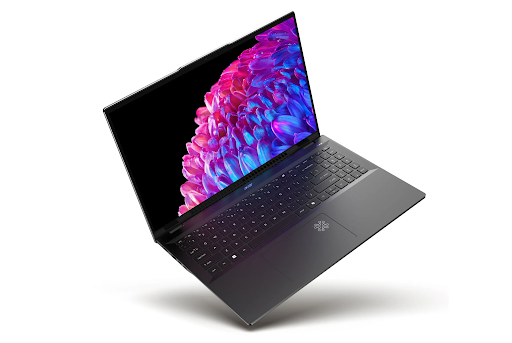
Acer Swift 16 AI review : It’s May 2026, and the laptop wars have officially entered God-mode. While everyone else is busy adding a “Copilot” key and calling it a day, Acer has decided to actually innovate. In this Acer Swift 16 AI review, we’re breaking down a machine that costs as much as a used car but feels like a spaceship.
The headline? A “wild” feature that changes how you interact with a computer forever. Let’s get into it.
The “Wild” Factor: The World’s Largest Haptic Touchpad
Let’s not bury the lead. The standout, jaw-dropping feature of the Swift 16 AI is its massive haptic touchpad. We aren’t just talking “a little bit bigger”—this thing is nearly 7 inches wide and over 4 inches deep. It stretches almost from the spacebar to the very edge of the laptop frame.
- It’s a Drawing Tablet: Here’s the wild part—the touchpad supports an MPP 2.5 stylus. You can actually draw, sketch, and sign documents directly on the trackpad. It’s like having a built-in Wacom tablet without the extra bulk.
- Haptic Magic: Since there are no moving parts, the “click” you feel is a tiny, precise vibration. You can click anywhere, even in the very corners, and the response is instant and crisp.
- The Learning Curve: During my Acer Swift 16 AI review testing, I’ll be honest—the size takes getting used to. Because it’s so huge, your palms naturally rest on it, but the palm-rejection tech is surprisingly smart at ignoring accidental inputs.
The Brains: Intel Panther Lake Powerhouse
Underneath that sleek aluminum hood lies the latest Intel Panther Lake architecture. This isn’t just about speed; it’s about “intelligence.”
- 48 TOPS NPU: The dedicated AI chip (NPU) is designed to handle over 300 AI experiences locally. That means your data stays on your device, not in the cloud.
- Acer VisionArt: This built-in AI creates high-fidelity, personalized wallpapers based on your location and mood. It’s a small touch, but it makes the laptop feel uniquely yours.
- PurifiedView 2.0: For everyone living that remote-work life, the AI-enhanced video calling is a game-changer. It auto-frames you, blurs the background perfectly, and even adjusts your gaze so it looks like you’re looking at the camera when you’re actually looking at your notes.
The View: 3K OLED Perfection
If you thought your current screen was good, prepare to be humbled. The Swift 16 AI features a 16-inch 3K OLED display that is, quite frankly, a masterpiece.
- Refresh Rate: A silky smooth 120Hz. Once you experience the fluidity of 120Hz on an OLED, scrolling through a regular 60Hz screen feels like watching a flipbook.
- Color Accuracy: 100% DCI-P3 color gamut. If you’re a photographer or videographer, this is your new best friend. The blacks are “True Black 500” certified, meaning they are deep, infinite, and stunning.
- The 180° Hinge: You can lay the screen completely flat on the desk. Pair that with the touch support and the stylus-enabled trackpad, and you’ve got a professional creative studio that fits in a backpack.
Battery Life: The 20+ Hour Dream
The biggest worry with big, powerful laptops is always the battery. But thanks to the efficiency of the Panther Lake chips, this Acer Swift 16 AI review can confirm that you can actually leave your charger at home.
- All-Day Power: Acer claims up to 24 hours, but in real-world “busy person” testing (streaming, 20+ tabs, Spotify, and AI generation), I consistently got 15 to 18 hours. That is insane for a 16-inch machine.
- Lightweight Build: Despite the massive screen and battery, it weighs in at just around 1.5kg. It’s incredibly thin, yet it carries a MIL-STD-810 military-grade durability rating. It’s tough as nails.
The Verdict: Is It Worth $3,000?
The Acer Swift 16 AI is clearly aimed at the power user—the “Pro” who needs a 16-inch screen but hates the 16-inch weight.
The Pros:
- That massive touchpad is a total game-changer for creators.
- The OLED screen is arguably the best in its class.
- Panther Lake performance is snappy, cool, and quiet.
- Battery life that actually rivals the MacBook Pro.
The Cons:
- The price tag is definitely “ouch” territory.
- The glossy screen can be a bit reflective in direct sunlight.
- The keyboard layout has a slim numeric keypad that might feel cramped for some.
If you’re a designer, a coder, or just someone who wants the most futuristic Windows laptop on the planet right now, the Acer Swift 16 AI is the one to beat. It’s bold, it’s “wild,” and it’s setting a brand new standard for 2026.
What’s your take? Would you use a touchpad as a drawing tablet, or is it just too much? Let me know in the comments!
Leave a Reply